Select data in DataGridView Rows and Show in TextBox Using C# MySQL Database
In this tutorial I will show you how to select MySQL Database Value in DataGridView using C# and show in TextBox
in a simple way.
Let’s follow tutorial below.
Step 1:
Create Project And Add Reference To C# WinForms Project. (visit the link to the first tutorial on how to add reference to our C# project)
How to connect MySQL Database to C# Tutorial and Source code
Step 2:
Open MySQL Workbench, right click and create schema (new database), give database name as “sampledb” and create table in database and give a name as “information”, then create columns id, emp_id, name, designation, username and password and then insert data into table.
visit the link below on the tutorial on how to insert record in mysql and c#
Insert or Save Data into MySQL Database using C#

Step 3:
Back to the windows forms application and design forms like this
- txtemp_id
- txtname
- txtdesignation
- txtusername
- txtpassword
- btnadd
- btnedit
- btndelete
- DataGridView1

Step 4:
- Click DataGridView1-> click Events in Properties->double click
CellMouseDoubleClick events
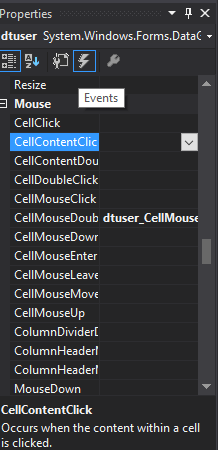
Source code for DataGridView1 CellMouseDoubleClick events:
using System;
using System.Collections.Generic;
using System.ComponentModel;
using System.Data;
using System.Drawing;
using System.Linq;
using System.Text;
using System.Threading.Tasks;
using System.Windows.Forms;
using MySql.Data.MySqlClient;

namespace CSHARP_FULL_COURSE_WITH_MYSQL_DATABASE
{
    public partial class information : Form
    {
public information ()
        {
            InitializeComponent();
        }
           private void DataGridView1_CellMouseDoubleClick(object sender, DataGridViewCellMouseEventArgs e)
        {
  if (e.RowIndex >= 0)
            {
                DataGridViewRow row = DataGridView1.Rows[e.RowIndex];
                txtemp_id.Text = row.Cells[0].Value.ToString();
                txtname.Text = row.Cells[1].Value.ToString();
                txtdeisgnation.Text = row.Cells[2].Value.ToString();
                txtusername.Text = row.Cells[3].Value.ToString();
                txtpassword.Text = row.Cells[4].Value.ToString();
            }
}
}
}
Code Explanation:
This code is for viewing data from datagridview to textbox, if you click datagridview rows the data will pass to textbox.
Result:
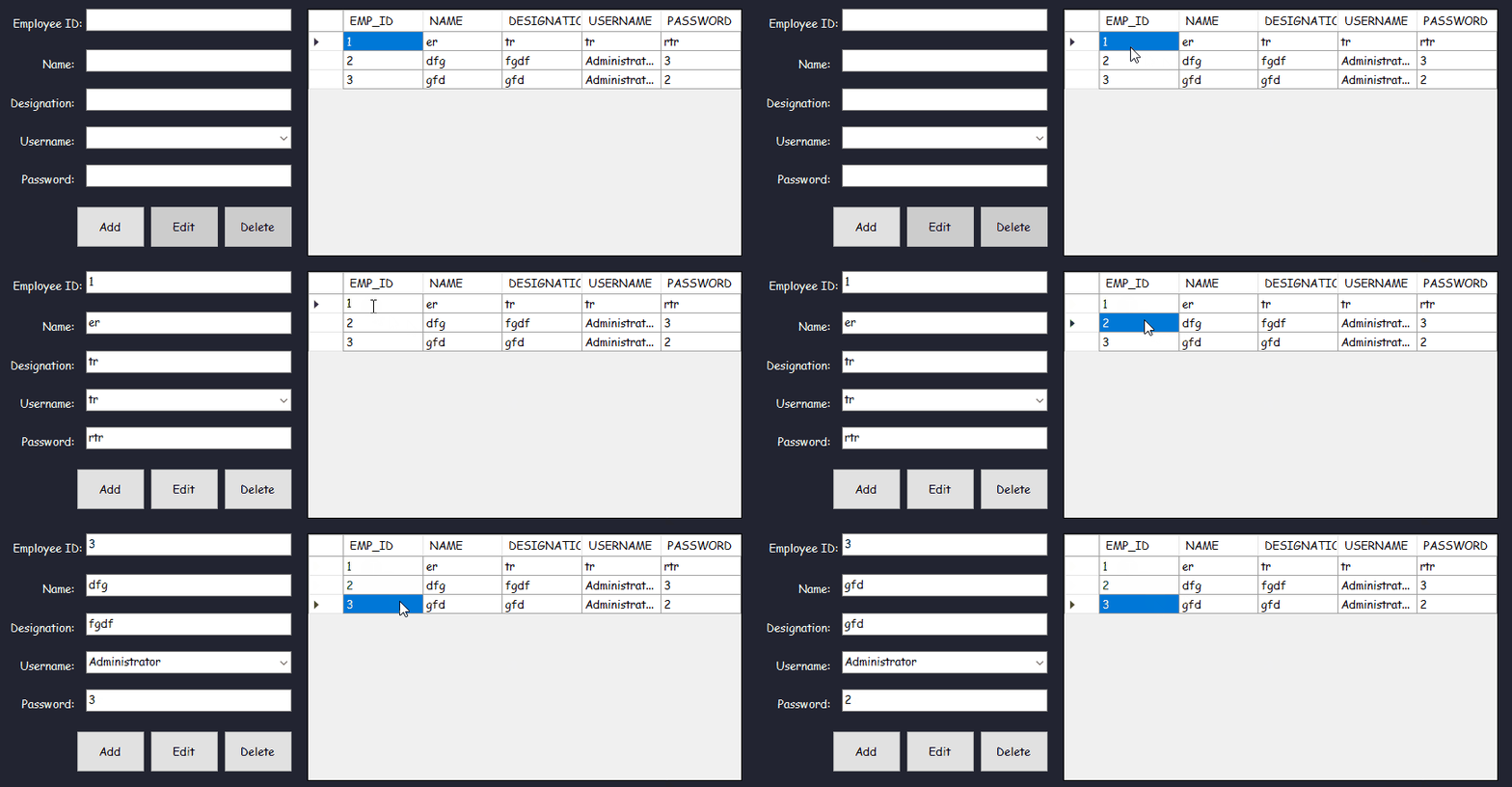
Select data in DataGridView Rows and Show in TextBox in C# Free Download Source code
Mark Jaylo
https://www.youtube.com/watch?v=Lm5f9x7aGko
You may visit our facebook page for more information, inquiries and comments.
Hire our team to do the project.