Create Login Attempt Limit Form in C# and MySQL Database
In this tutorial, I will show you how to create login attempt limit forms, lock user account after 3 failed login attempts
Let’s follow this tutorial below.
Step 1:
Create Project And Add Reference To C# WinForms Project. (visit the link to the first tutorial on how to add reference to our C# project)
How to connect MySQL Database to C# Tutorial and Source code
Step 2:
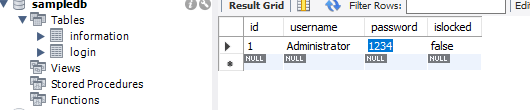
Open MySQL Workbench, right click and create schema (new database), give database name as “sampledb” and create table in database and give a name as “login”, then create columns id, username, password, and islocked.
visit the link below on the tutorial on how to insert record in mysql and c#
Insert or Save Data into MySQL Database using C#
Steps 3:
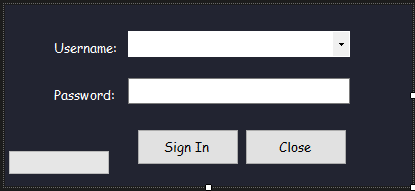
Back to the windows forms application and design login forms like this
- txtusername
- txtpassword
- btnsignin
- btnclose
Steps 4:
Source Code for Sign In button(btnsignin) clicked event:
using System;
using System.Collections.Generic;
using System.ComponentModel;
using System.Data;
using System.Drawing;
using System.Linq;
using System.Text;
using System.Threading.Tasks;
using System.Windows.Forms;
using MySql.Data.MySqlClient;

namespace CSHARP_FULL_COURSE_WITH_MYSQL_DATABASE
{
    public partial class loginform : Form
    {
  public loginform()
        {
            InitializeComponent();
        }
        private void btnsignin_Click(object sender, EventArgs e)
        {
               int attempts = 0;
               MySqlConnection con = new MySqlConnection("datasource= localhost; database=sampledb;port=3306; username = root; password= db1234"); //open connection
               con.Open();
  if (attempts == 3)
            {
                MySqlCommand cmdlocked = new MySqlCommand("Update login set islocked = '" + "true" + "' where username = '" + txtusername.Text + "'", con);
                MySqlDataReader readerlocked = cmdlocked.ExecuteReader();
                cmdlocked.Dispose();
                readerlocked.Close();
                con.Close();
                MessageBox.Show("Your Account Locked Already : Contact Administrator", "Vinsmoke MJ",MessageBoxButtons.OK,MessageBoxIcon.Error);
            }
            else
            {
                MySqlCommand cmdislocked = new MySqlCommand("select islocked from login where username = '"+ txtusername.Text +"' AND islocked = '"+"true"+"'",con);
                MySqlDataReader readerislocked = cmdislocked.ExecuteReader();
                if (readerislocked.Read())
                {
                    readerislocked.Close();
                    cmdislocked.Dispose();
                    con.Close();
                    MessageBox.Show("Your Account Locked Already : Contact Administrator", "Vinsmoke MJ", MessageBoxButtons.OK, MessageBoxIcon.Error);
                }
                else
                {
                    readerislocked.Close();
                    cmdislocked.Dispose();
                    MySqlCommand cmd = new MySqlCommand("select * from login where username = '" + txtusername.Text + "' AND password = '" + txtpassword.Text + "'", con);
                    MySqlDataReader reader = cmd.ExecuteReader();
                    if (reader.Read())
                    {
                        reader.Close();
                        cmd.Dispose();
                        con.Close();
                        attempts = 0;
                        MessageBox.Show("Successfully Sign In!", "VINSMOKE MJ", MessageBoxButtons.OK, MessageBoxIcon.Information);
                    }
                    else
                    {
                        reader.Close();
                        cmd.Dispose();
                        attempts++;
                        MessageBox.Show("Username or Password Not Match!, "+ attempts +" attempts", "VINSMOKE MJ", MessageBoxButtons.OK, MessageBoxIcon.Error);

                    }
                }
            }
        }
    }
}
Code Explanation:
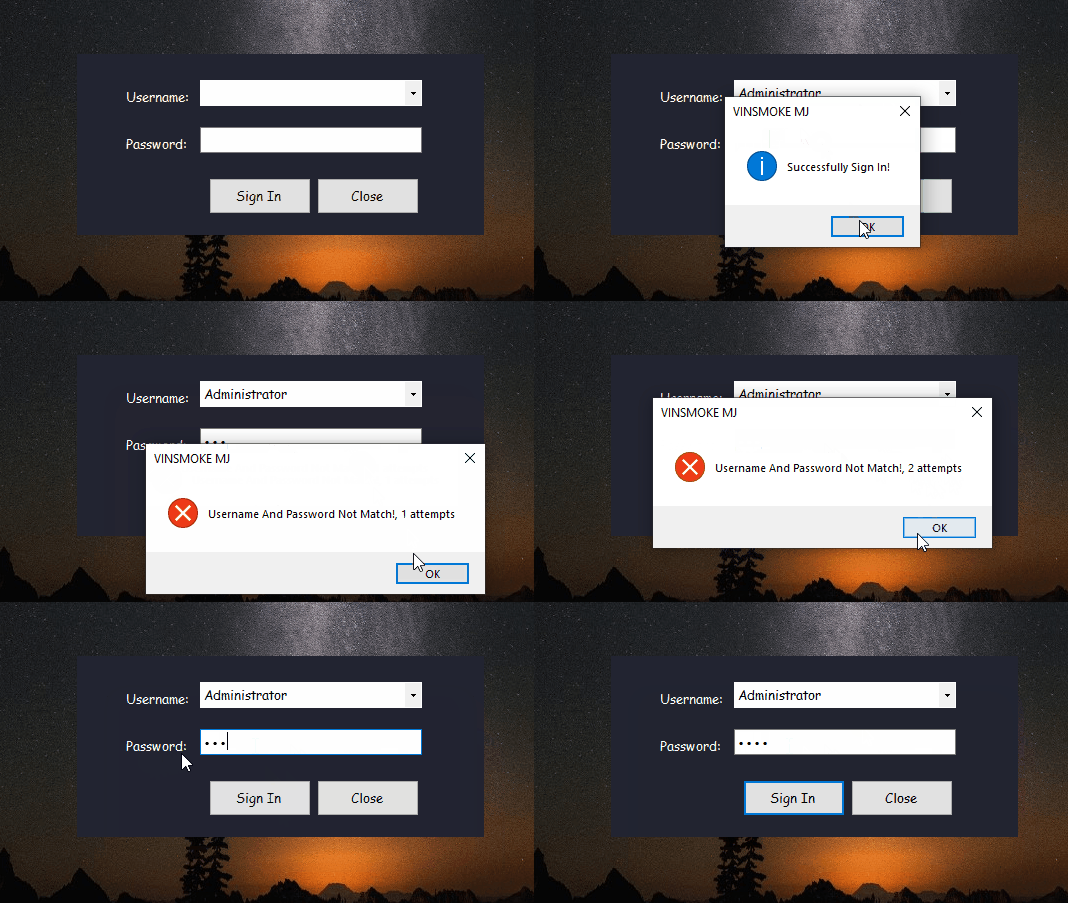
This code is for login attempts limit, if the user account failed to login 3 times or more the user account will be locked and Administrator only can unlocked the account.
Result:
Create Login Attempt Limit Form in C# Free Download Source code
Mark Jaylo
https://www.youtube.com/watch?v=Tc6ScWU9WLI&list=PLyrZdI7gZW7qhN-RwK1b5EqIzfHz5fh9F&index=2
You may visit our facebook page for more information, inquiries and comments.
Hire our team to do the project.