Building the Blueprint: Developing a Custom Construction Accounting and Job Costing Platform
Table of Contents
- Building the Blueprint: Developing a Custom Construction Accounting and Job Costing Platform
- Why Custom Development? (And Why This Stack?)
- 1. The Core Architecture: Job Costing vs. General Accounting
- The Database Design (The MySQL Heart)
- 2. Developing the Logic with PHP
- Managing the “Percentage of Completion”
- Handling Retainage
- 3. The User Experience: Bootstrap to the Rescue
- Responsive Dashboards
- Interactive Forms
- 4. Key Features Your Platform Needs
- Change Order Management
- The WIP (Work in Progress) Report
- 5. Security and Data Integrity
- 6. Overcoming the “AI-Generated” Feel
- Conclusion: The Foundation is Everything
Let’s be honest: the construction industry is notoriously messy. Between the sawdust, the fluctuating cost of lumber, and the subcontractors who “forgot” to submit their invoices, keeping track of money is a nightmare. Most general contractors are still stuck in “Spreadsheet Hell”—a place where one broken cell in Excel can lead to a $50,000 budgeting error.
If you’re a developer tasked with building a custom Construction Accounting and Job Costing System, you’re not just building an app; you’re building a survival tool. Today, we’re going to look under the hood at how to architect an online platform using the classic, reliable stack of PHP, MySQL, and Bootstrap.
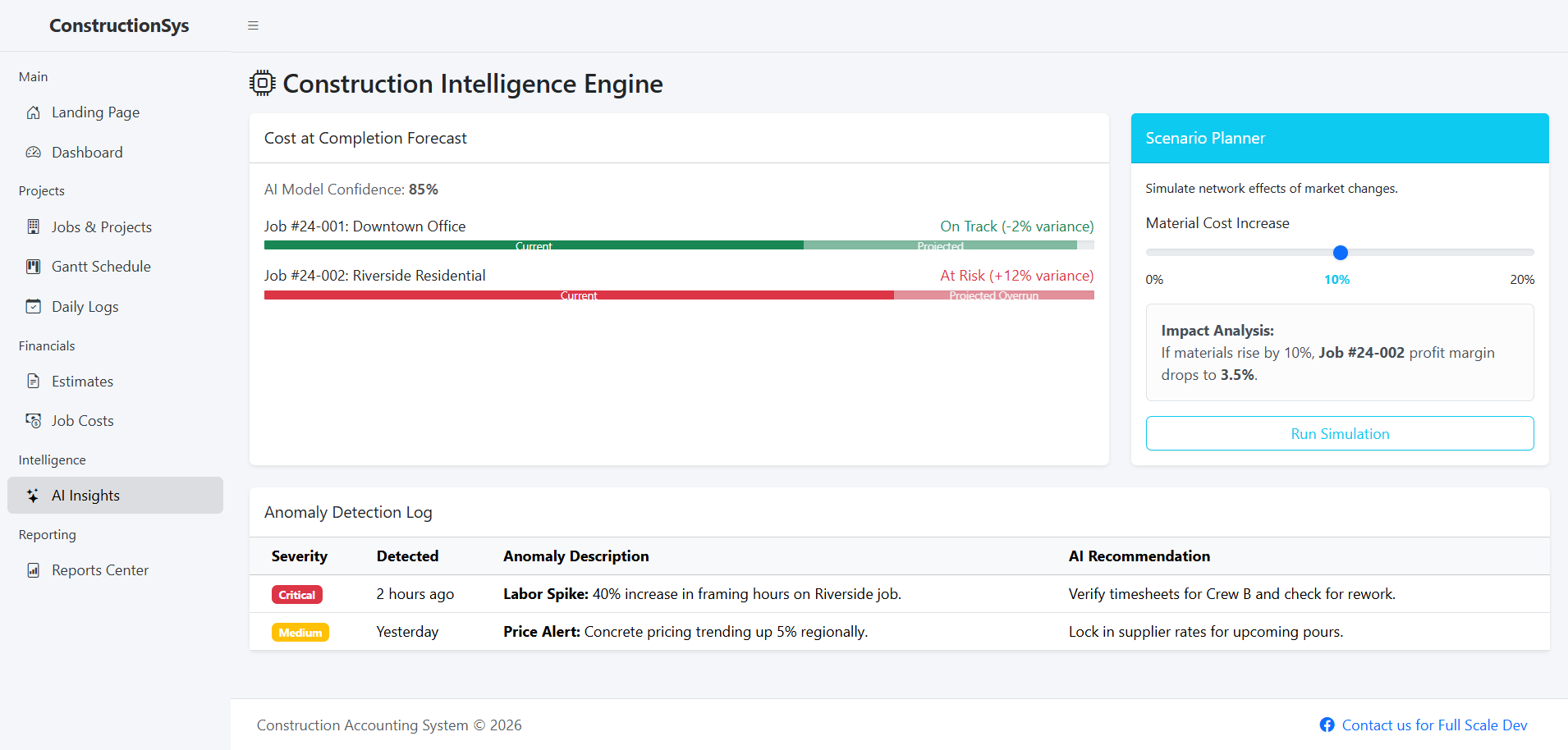
Why Custom Development? (And Why This Stack?)
You might wonder, “Why not just use QuickBooks?”
QuickBooks is great for a bakery. It’s significantly less great for a multi-million dollar infrastructure project involving retainage, change orders, and burdened labor rates. Off-the-shelf software is often too rigid or too expensive once you start adding seats for every project manager in the field.
By building on PHP and MySQL, you’re opting for a proven, scalable foundation. PHP handles the heavy lifting of business logic with ease, and MySQL’s relational nature is perfect for the complex data webs construction requires. Bootstrap ensures that the site foreman can check the budget on a dusty iPad just as easily as the accountant can on a 32-inch monitor.
1. The Core Architecture: Job Costing vs. General Accounting
In standard accounting, you care about “The Company.” In construction accounting, you care about “The Job.”
A Job Costing system must track every expense back to a specific project and a specific cost code (e.g., 03-300 for Cast-in-Place Concrete).
The Database Design (The MySQL Heart)
Your database is the most important part of this build. If your schema is weak, your reports will be lies. You’ll need several core tables:
-
jobs: The high-level project data (Budget, Location, Timeline). -
cost_codes: The dictionary of work types. -
commitments: Subcontracts and Purchase Orders (money you will spend). -
actual_costs: Invoices and Payroll (money you have spent). -
change_orders: The inevitable shifts in scope.
2. Developing the Logic with PHP
PHP is your engine. When a project manager enters a new invoice, your backend logic needs to do more than just save a record. It needs to calculate the Variance.
Managing the “Percentage of Completion”
Unlike a retail store where a sale happens and it’s over, construction happens over months or years. You’ll need to implement the Percentage of Completion (POC) method in your PHP logic. This involves calculating:
If your PHP script doesn’t handle this, the company’s financial statements will be wildly inaccurate.
Handling Retainage
In construction, the client often withholds 5-10% of every payment until the job is finished. This is called retainage. Your system must be able to track “Accounts Receivable” and “Retainage Receivable” separately. In your MySQL queries, you’ll be doing a lot of SUM() functions where status = 'held_retainage'.
3. The User Experience: Bootstrap to the Rescue
Field staff hate complicated software. If it takes more than three clicks to upload a receipt, they won’t do it.
Responsive Dashboards
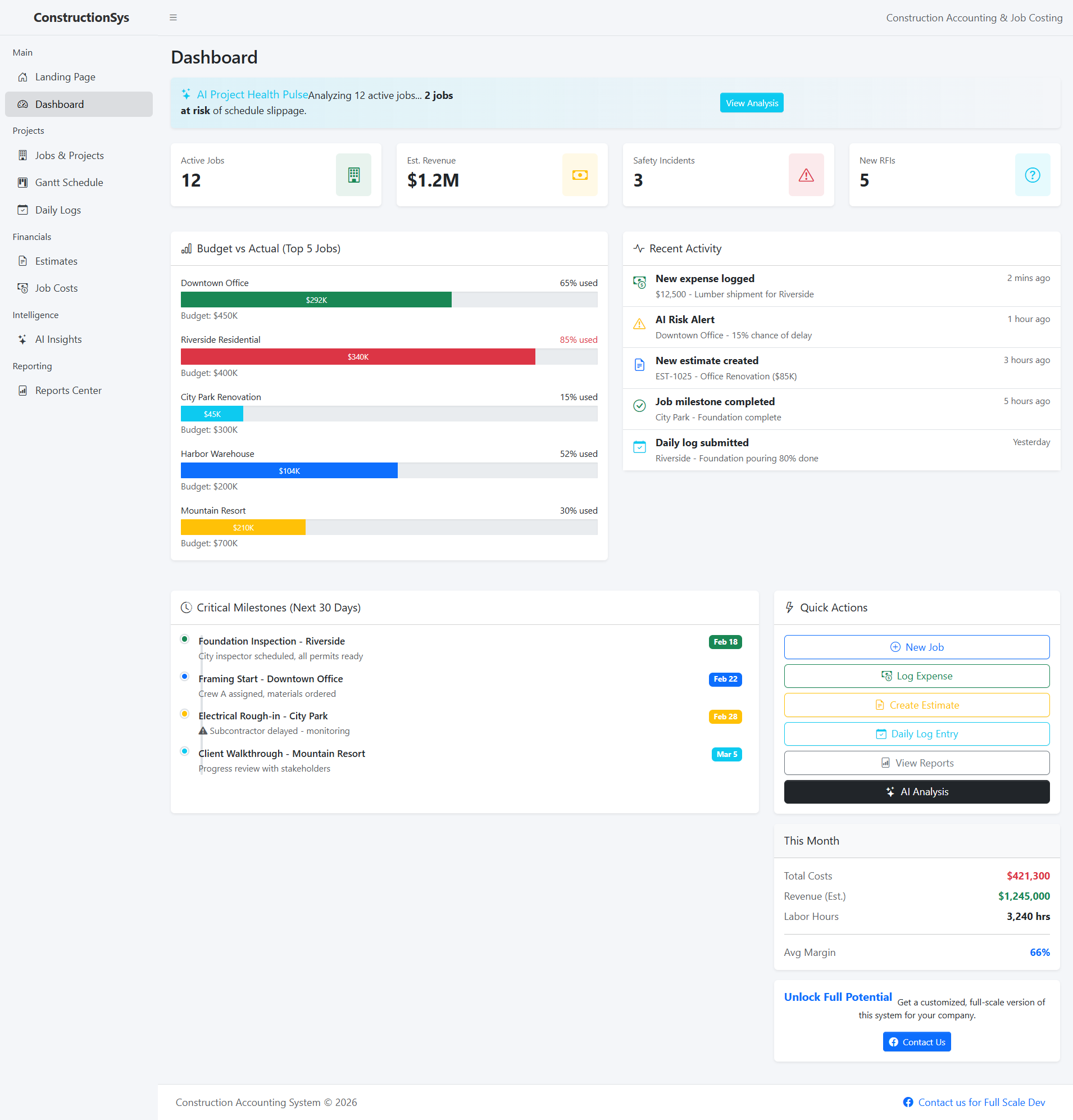
Using Bootstrap’s grid system, you can create a “Project at a Glance” dashboard.
-
Desktop: A wide table showing Budget vs. Actual vs. Committed.
-
Mobile: A simplified “Traffic Light” system (Green = under budget, Red = over budget).
Interactive Forms
Bootstrap’s form components, combined with a little AJAX, make for a seamless experience. When a user selects a “Job,” the “Cost Code” dropdown should filter automatically. This prevents a user from accidentally billing “Electrical” work to a “Landscaping” project.
4. Key Features Your Platform Needs
Change Order Management
Change orders are the number one reason projects go off the rails. Your system needs a workflow where a change order is drafted, sent for approval, and—once signed—automatically updates the Revised Budget.
The WIP (Work in Progress) Report
This is the “Holy Grail” of construction accounting. It’s a massive report that shows the financial health of every active project. Building this in PHP requires heavy SQL optimization, as you’ll be joining budget, costs, and billing tables across thousands of rows.
Pro Tip: Don’t calculate WIP in real-time for the entire company every time the page loads. Use a cron job to “snapshot” the data once an hour to keep the platform snappy.
5. Security and Data Integrity
You’re dealing with bank accounts, payroll, and sensitive contracts.
-
Prepared Statements: Never, ever insert a variable directly into a MySQL query. Use PDO or MySQLi prepared statements to prevent SQL injection.
-
Role-Based Access Control (RBAC): A project manager should see their own jobs, but not the company’s overall overhead or other PMs’ salaries.
-
The Audit Trail: Every time a budget is changed, your PHP script should log who did it, when, and the old vs. new value.
6. Overcoming the “AI-Generated” Feel
Many modern platforms feel “soulless” because they use generic templates and robotic notifications. To make this platform feel like it was built for humans by humans:
-
Use Industry Language: Don’t just say “Add Item.” Say “Post Direct Cost” or “Issue Subcontract.”
-
Contextual Alerts: Instead of a generic error message, have your PHP script return something helpful: “Hey, this invoice exceeds the remaining budget for ‘Drywall’ by $400. Do you need to issue a Change Order first?”
-
Human-Centric UI: Add a “Notes” or “Daily Log” section where foremen can explain why a cost was high (e.g., “Rain delay” or “Subcontractor no-show”).
Conclusion: The Foundation is Everything
Building a Construction Accounting and Job Costing system is a marathon, not a sprint. By leveraging PHP for its logic, MySQL for its relational power, and Bootstrap for its accessibility, you can create a platform that rivals expensive enterprise software.
The goal isn’t just to track numbers; it’s to provide clarity. When a contractor knows exactly where their money is, they can stop worrying about the bank and start focusing on the build.
You may visit our Facebook page for more information, inquiries, and comments. Please subscribe also to our YouTube Channel to receive free capstone projects resources and computer programming tutorials.
Hire our team to do the project.