Automated Document Classification & Routing System
Table of Contents
- Automated Document Classification & Routing System
- A Smart, UI-Driven Solution for Efficient and Intelligent Document Management
- Introduction
- Project Overview
- Objectives of the System
- Key Features of the Automated Document Classification & Routing System
- Dashboard
- Document Management Module
- Document Upload Interface
- Automated Document Classification
- Document Routing and Assignment
- Pending Documents Management
- User Interface and User Experience Design
- UI Highlights:
- End-to-End System Workflow
- Reports and Analytics
- Benefits of the Automated Document Classification & Routing System
- Potential Future Enhancements
- Conclusion
A Smart, UI-Driven Solution for Efficient and Intelligent Document Management
Introduction
In today’s digital-first environment, organizations generate and process large volumes of documents daily. These include memorandums, letters, reports, requests, forms, and official communications. Despite advancements in technology, many offices—particularly local government units (LGUs), educational institutions, and administrative organizations—still rely on manual processes for sorting, classifying, and routing documents. This approach often results in processing delays, misclassification, document loss, and limited visibility into document status.
To address these challenges, the Automated Document Classification & Routing System was designed and developed. This system introduces automation into document handling by combining intelligent classification mechanisms with a structured and user-friendly web interface. By minimizing manual intervention and enforcing a clear workflow, the system significantly improves efficiency, accuracy, and accountability in document management.
Project Overview
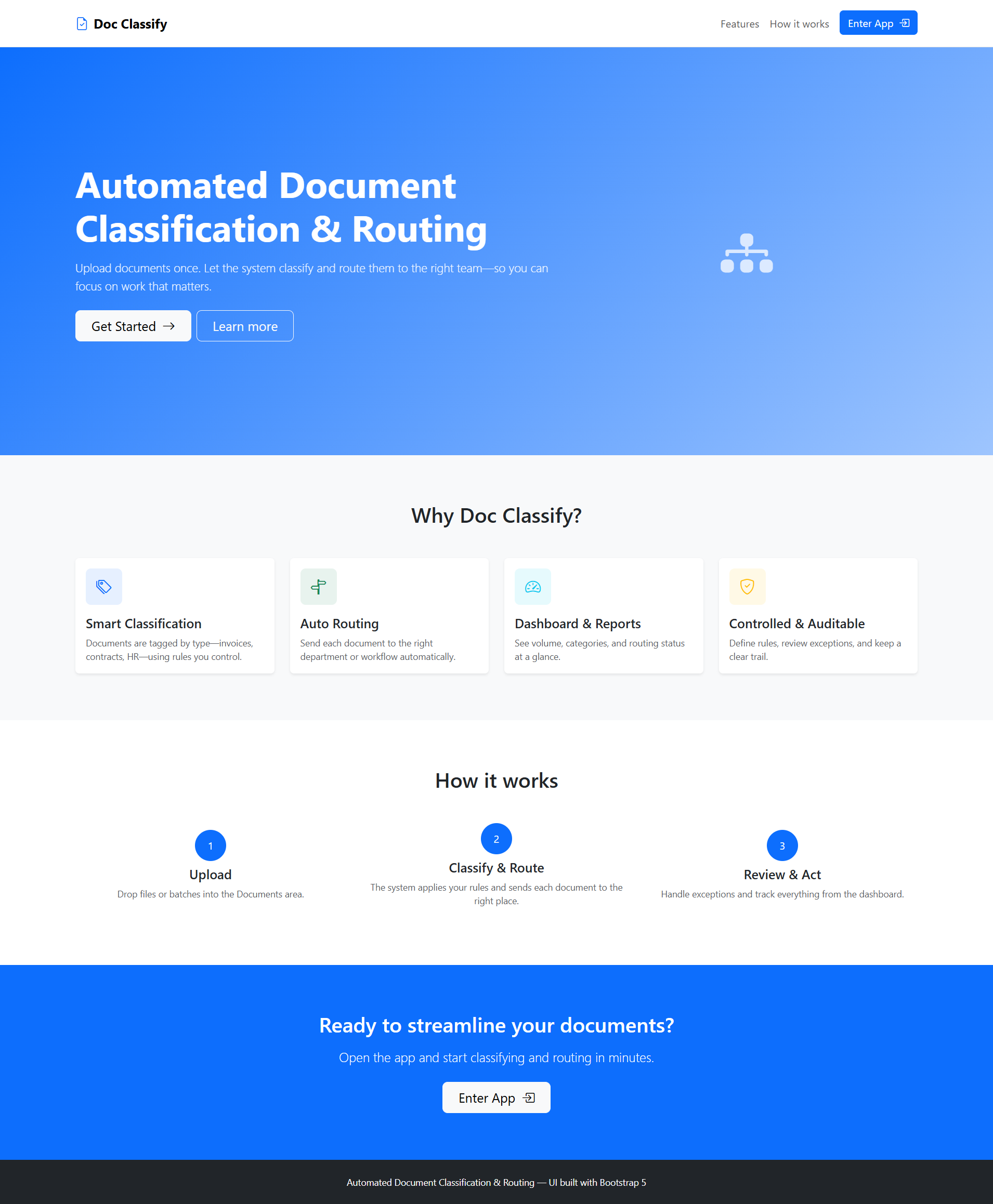
The Automated Document Classification & Routing System is a web-based document management platform that automates the intake, classification, assignment, and tracking of documents. It is built to support organizations that require reliable and scalable document workflows.
The system is designed for multiple user roles, including:
- Administrative staff
- Document control officers
- Department personnel
- System administrators
Its primary function is to automatically analyze uploaded documents, classify them based on content or predefined rules, and route them to the appropriate department or responsible user. The system also provides tracking and reporting features to ensure transparency throughout the document lifecycle.
Objectives of the System
The development of the system is guided by the following objectives:
- Reduce reliance on manual document sorting and routing
- Improve classification accuracy and consistency
- Speed up document processing and response time
- Provide real-time tracking of document status
- Enhance accountability through clear audit trails
- Support data-driven management through reporting and analytics
These objectives align with modern digital transformation initiatives and promote operational efficiency.
Key Features of the Automated Document Classification & Routing System
Dashboard
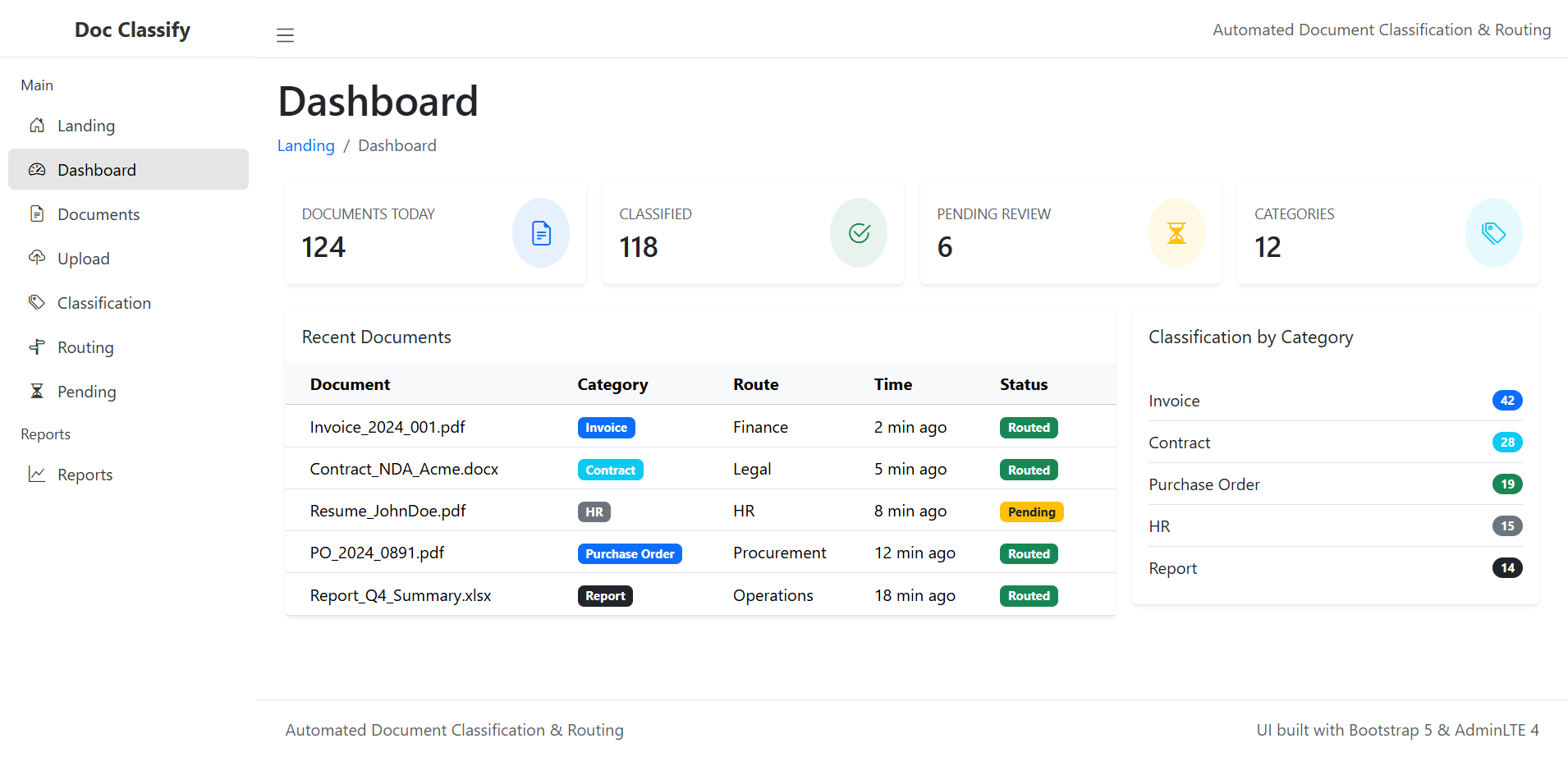
The Dashboard serves as the central control panel of the system. Upon login, users are presented with a summarized view of document activities and system performance.
Key dashboard components include:
- Total number of documents in the system
- Documents pending classification or routing
- Completed and routed documents
- Visual charts showing document distribution by status or type
- Recent document activity logs
This overview allows users and administrators to quickly assess system workload, identify bottlenecks, and prioritize actions.
Document Management Module
The Documents module acts as a centralized repository where all uploaded files are stored and managed. This module ensures that documents are well-organized and easily accessible.
Core functionalities include:
- Tabular listing of all documents
- Search and filter options (by status, type, date, or department)
- Document preview and metadata viewing
- Status indicators for quick identification
By centralizing document access, the system eliminates redundancy and improves retrieval efficiency.
Document Upload Interface
The Upload page is the primary entry point for documents into the system. It is designed with usability in mind to accommodate users with varying technical skill levels.
Features include:
- Simple file selection or drag-and-drop upload
- Support for common document formats (PDF, DOCX, images)
- Optional metadata input (title, source, priority)
- Upload progress indicators
Once uploaded, documents are automatically forwarded to the classification pipeline, ensuring seamless processing.
Automated Document Classification
The Classification module is the intelligence core of the system. It automatically analyzes document content to determine its type or category.
Key aspects of this feature include:
- Automatic detection of document type
- Confidence-based classification results
- Keyword or content pattern analysis
- Manual override options for human validation
This hybrid approach balances automation with control, allowing organizations to maintain accuracy while benefiting from efficiency.
Document Routing and Assignment
After classification, documents proceed to the Routing module. Here, documents are assigned to the appropriate department, office, or individual.
Routing can be:
- Rule-based, where predefined conditions determine the destination
- Manual, allowing administrators to reassign documents when necessary
Routing features ensure that documents reach the correct recipient promptly, reducing delays and miscommunication.
Pending Documents Management
The Pending section highlights documents that are awaiting action. This page plays a crucial role in preventing workflow stagnation.
Users can:
- View documents pending classification, routing, or action
- Identify overdue or high-priority documents
- Take immediate action to resolve backlogs
This visibility promotes accountability and helps maintain operational momentum.
User Interface and User Experience Design
The system’s frontend is built using Bootstrap and AdminLTE, ensuring a modern, responsive, and consistent user experience across devices.
UI Highlights:
- Clean sidebar navigation
- Clear icons and labels for each module
- Responsive layout for desktop and mobile use
- Consistent color schemes and typography
The sidebar menu typically includes:
- Landing
- Dashboard
- Documents
- Upload
- Classification
- Routing
- Pending
- Reports
The interface is designed to reduce cognitive load and guide users naturally through the document workflow.
End-to-End System Workflow
The system follows a structured and logical document lifecycle:
- Document Upload
Users submit documents through the upload interface. - Automated Classification
The system analyzes content and assigns a document category. - Review and Validation
Users verify or adjust classification results if required. - Routing and Assignment
Documents are forwarded to the correct department or user. - Tracking and Completion
Documents are monitored until processing is completed.
This workflow ensures consistency, traceability, and efficiency.
Reports and Analytics
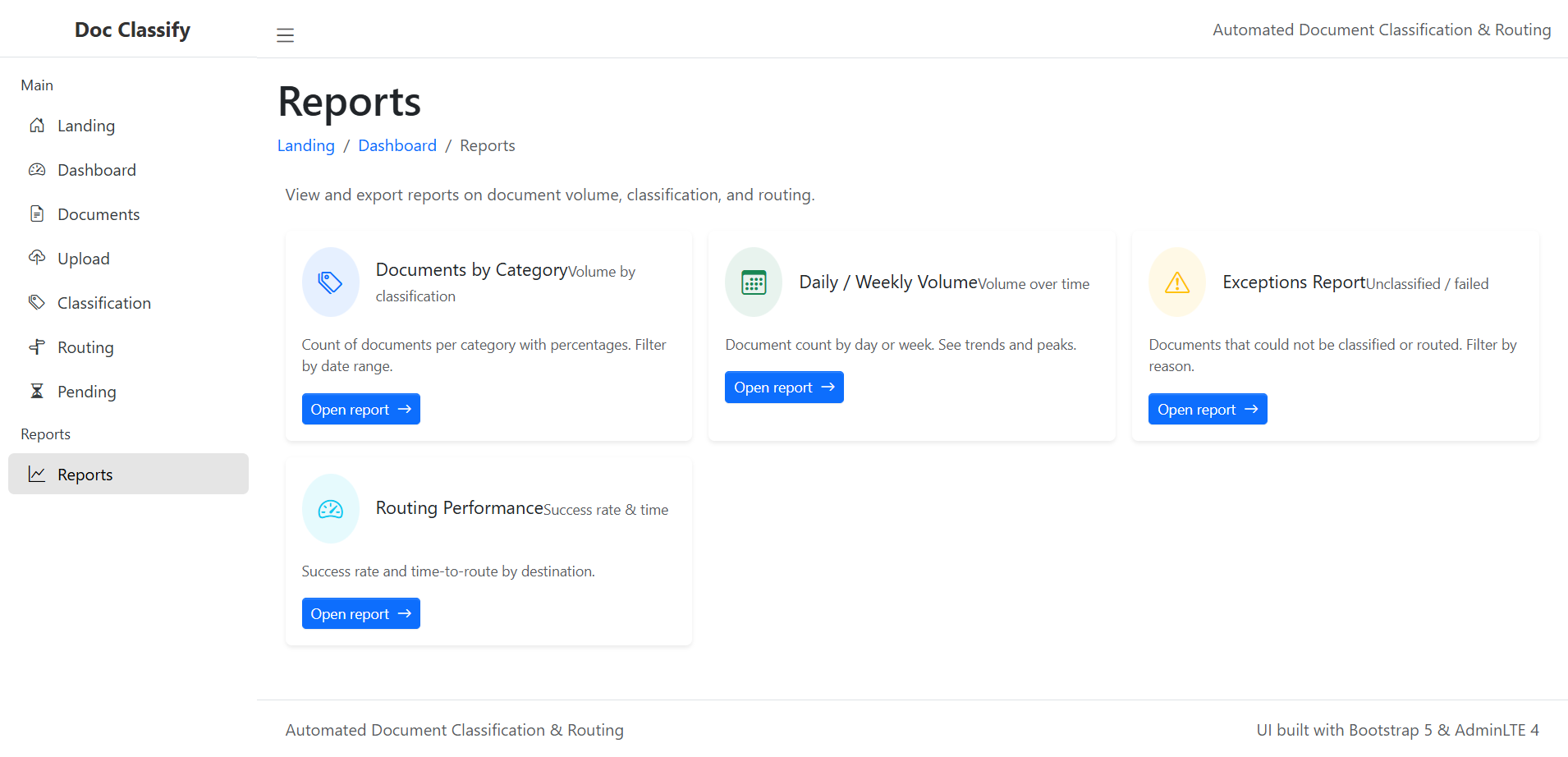
The Reports module provides insights into system usage and performance. These reports support operational planning and continuous improvement.
Available reports may include:
- Document volume over time
- Processing time analysis
- Status distribution reports
- Department-level document activity
Reports can be viewed on-screen or exported for administrative use, supporting data-driven decision-making.
Benefits of the Automated Document Classification & Routing System
Implementing this system provides several organizational benefits:
- Faster document processing and turnaround time
- Reduced human error in classification and routing
- Improved transparency and accountability
- Centralized and secure document storage
- Scalable architecture for future growth
- Better resource utilization
These benefits contribute directly to improved service delivery and operational efficiency.
Potential Future Enhancements
The system is designed with scalability in mind. Possible future enhancements include:
- Advanced machine learning models for improved classification accuracy
- Integration with email and records management systems
- Role-based access control and detailed audit logs
- Advanced analytics dashboards
- Notification and alert mechanisms
These enhancements can further strengthen the system’s capabilities.
Conclusion
The Automated Document Classification & Routing System demonstrates how intelligent automation and thoughtful user interface design can transform traditional document handling processes. By reducing manual effort, improving accuracy, and providing real-time visibility, the system supports efficient, transparent, and scalable document management.
This project reflects the growing importance of digital solutions in administrative environments and highlights the value of combining automation with user-centered design to deliver practical and impactful systems.
You may visit our Facebook page for more information, inquiries, and comments. Please subscribe also to our YouTube Channel to receive free capstone projects resources and computer programming tutorials.
Hire our team to do the project.